LEGO CMF Scanner: know what’s in the box before you open it.
Point your phone at the code on a sealed Collectible Minifigure box and VueBrick tells you which figure is inside, and what it sells for.
Free. No card required. Works in your phone’s browser.

How it works
Three steps, and the box stays sealed.
- Step 1
Point at the code
Find the small square Data Matrix code printed on the sealed box. Hold the panel flat in the frame.
- Step 2
VueBrick reads it
The code is matched to the figure it belongs to. No guessing by feel, no squeezing the bag through the cardboard.
- Step 3
See the figure and its price
Name, series, and BrickLink price. Scan the next box.
Where it earns its keep
Blind boxes are a gamble for buyers. They do not have to be one for you.
Buying sealed at retail or in lots
Standing at the display with a full case in front of you. Scan the row, pull the figures that are actually worth the price, leave the rest.
Sorting a case before listing
Work through the box one bag at a time and list each one by name, still sealed.
Checking a seller’s “sealed” claim
A box listed as a chase figure should scan as one. If the code says otherwise, you know before the money moves.

What you see after a scan
Everything you need to decide, on a free account.
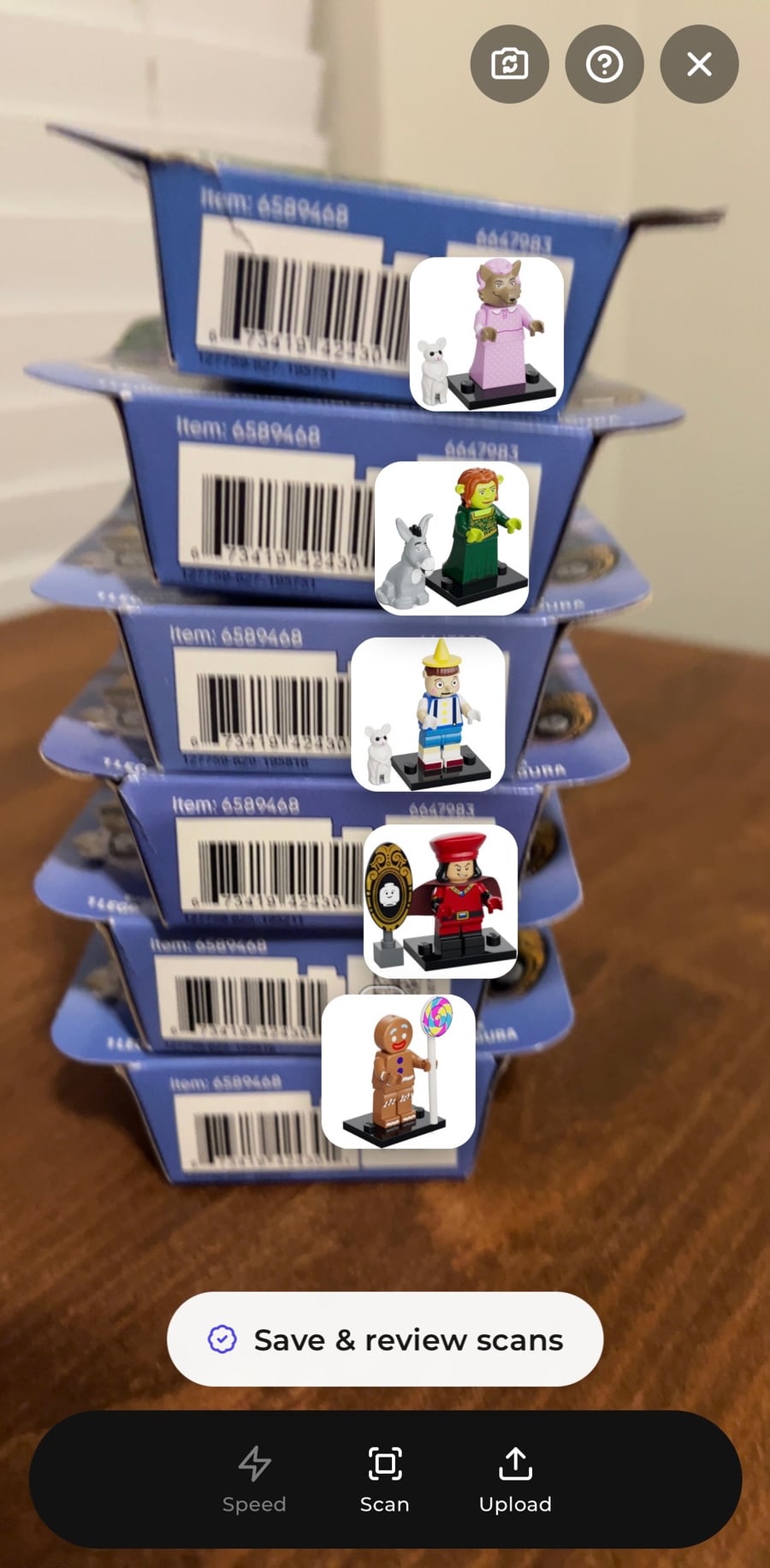
- The figure on every boxThe live view puts each figure’s picture on its box as the code is read, so the one you want stands out in a row.
- Name, series, and BrickLink IDTap the shutter, or upload a photo of the code, and a result sheet opens with the figure’s name, series, and catalog ID, like colshr-10.
- BrickLink priceFrom real sales in the market and currency you choose, so you know what a box is worth before you buy it.
- Not in the catalog yetA code the scanner does not know yet gets a question mark, not a guess. Coverage grows as new series ship.
ProSaving boxes into a session, with quantities and a running total.
Free forever. Pro when the pile gets serious.
The CMF Scanner and Quick Scan are free with an account. Pro is for working through a whole case and getting it listed.
Questions about the CMF Scanner
How does a LEGO CMF scanner work?
Every sealed LEGO Collectible Minifigure box carries a small printed Data Matrix code that identifies the figure inside. The VueBrick CMF Scanner reads that code with your phone camera, looks it up, and shows you the figure, its series, and its BrickLink price. Nothing is opened or squeezed.
Does it work on sealed boxes?
Yes. Sealed boxes are the whole point. The code is printed on the outside of the box, so the figure stays sealed and sells as sealed.
Which CMF series are supported?
Series 25 through 29, plus Dungeons & Dragons, Spider-Verse, F1 Race Cars, Mighty Machines, and Shrek. Coverage grows as new series ship.
Is the CMF Scanner free?
Yes. Identifying boxes with the CMF Scanner is free with a VueBrick account, with no card required. Saving those scans into a session with running totals and exports is part of VueBrick Pro.
Does it work on iPhone and Android?
Yes. VueBrick runs in your phone’s browser, so there is nothing to download from an app store. Open app.vuebrick.com, allow the camera, and scan. You can add it to your home screen so it opens like an app.
Can I scan a whole case?
Yes. Point the camera along a shelf or a row of boxes and the scanner puts each figure’s picture on its box as it finds the code, then clears it when the box leaves the frame. With Pro, several boxes of the same figure stage as one row with a quantity, ready to save.